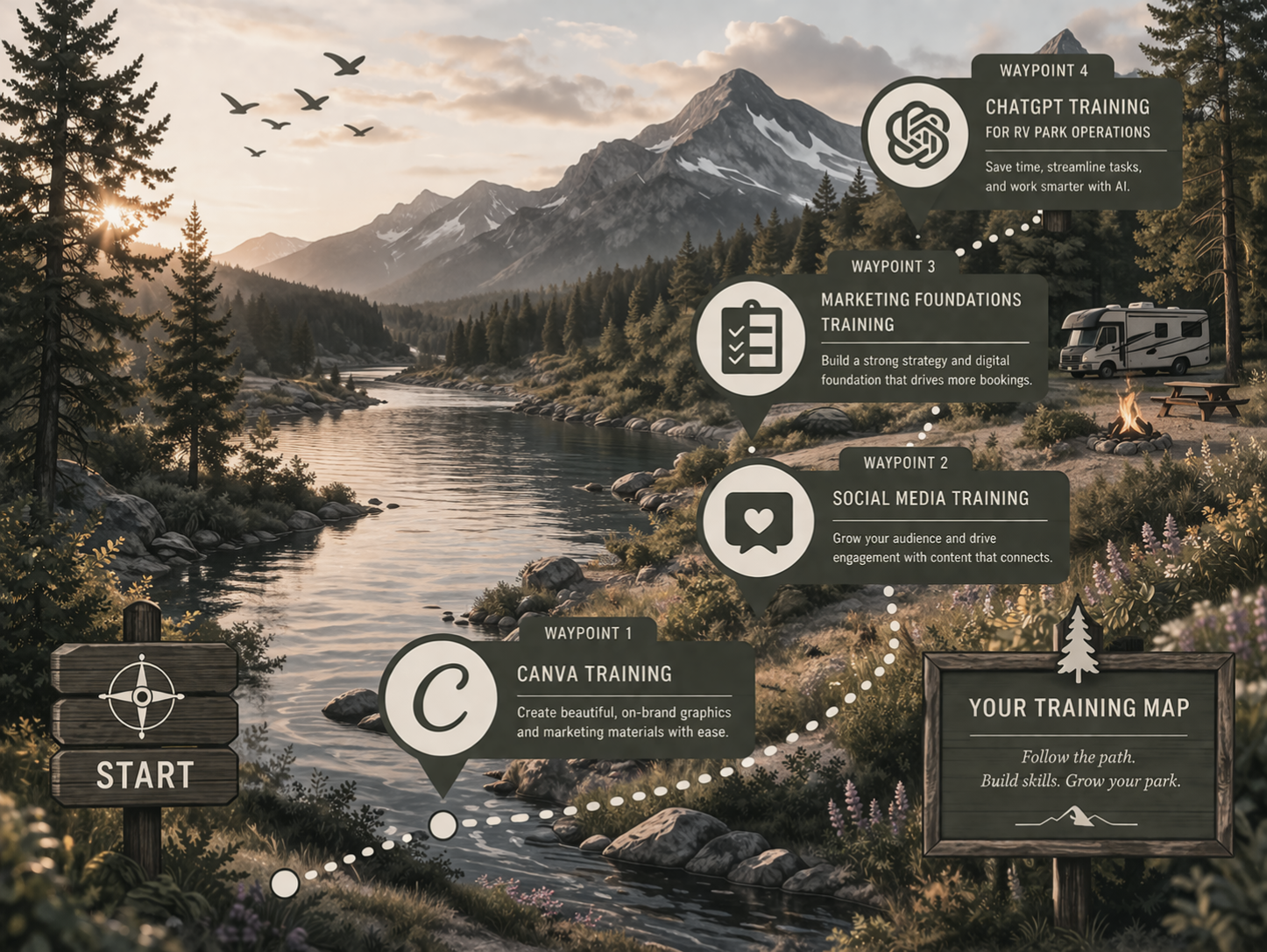
Each training focuses on a key skill area your park relies on — helping you build capability, reduce frustration, and create better results across your business.
These Waypoints are designed to work together, giving you the knowledge and confidence to take action — or the understanding to know exactly when to delegate.
Before you can improve your marketing, your content, or your systems, you need to understand the tools that make it all possible.
The Map is your starting point.
The
Training Path
is designed to help you build real, practical skills that support your park’s day-to-day operations and long-term growth.
Instead of feeling stuck, overwhelmed, or unsure where to begin, these
trainings walk you through the tools you’ll use most—step by step, in a way that actually makes sense for RV parks.
Some parks want to
learn just enough to manage things in-house
with confidence. Others want a deeper understanding so they can
move faster, make better decisions, or work more effectively
with outside support.
Wherever you are in your journey, The Map gives you the foundation to move forward with clarity, confidence, and control.
The Four Waypoints of Training
Learn the Landscape. Build Your Skills. Move With Confidence.
The Map
Create professional graphics for your park
First impressions matter — and most travelers will see your park online before they ever arrive.
In this training, you'll learn how to use Canva to create clean, professional graphics for your park’s marketing.
From social media posts and event promotions to announcements and park highlights, you’ll learn how to design materials that represent your park clearly and consistently.
By the end of this training, you'll be able to
create graphics
that make your park look polished, welcoming, and ready for guests.
Waypoint 1
Canva Training
$200 per session
Simple, branded graphics — created confidently.
✔ Use Canva’s core tools with ease
✔ Edit and customize templates quickly
✔ Update graphics, photos, and text confidently
✔ Apply your brand kit for a cohesive look
✔ Keep visuals consistent across all platforms
✔ Avoid common design mistakes that weaken your brand
Delivered live via Google Meet
Learn what to post to attract guests
Many parks know they should be active on social media — but most struggle with what to post or how often.
This training shows you how to use social media as a tool to showcase your park, highlight experiences, and stay visible to travelers planning their next trip.
You'll learn simple content ideas that work well for RV parks, how to keep your pages active without feeling overwhelmed, and how to create posts that invite engagement and interest.
The goal is to make social media feel manageable and purposeful.
Waypoint 2
Social Media Training

$200 per session
Simple, practical guidance to help your team post confidently and professionally.
✔ Know which platforms matter most for your park—and why
✔ Learn simple posting and scheduling basics
✔ Choose photos that attract attention and bookings
✔ Write friendly, on-brand captions with ease
✔ Understand core do’s and don’ts
✔ Communicate professionally with guests online
A clear, beginner-friendly session that
builds confidence and keeps your online presence consistent and welcoming.
Understand how RV park marketing works
Marketing can feel confusing when you’re juggling websites, social media, reviews, and advertising all at once.
This training helps you step back and understand the bigger picture.
You'll learn how different marketing channels work together, how travelers discover parks online, and how to focus your efforts where they matter most.
With this foundation in place, it becomes much easier to make smart marketing decisions for your park.
Waypoint 3
Marketing Foundations Training

$200 per session
Understand the “why” behind your park’s marketing.
✔ What modern travelers look for when choosing a park
✔ Why branding matters—and how it shapes first impressions
✔ How visibility works (and how guests actually find you)
✔ How content influences bookings and guest decisions
✔ What builds trust, confidence, and credibility online
Know what matters, what doesn’t —
and where to focus your efforts moving forward.
Use AI to simplify marketing and communication
Modern tools can save park owners a tremendous amount of time — if you know how to use them.
In this training, you'll learn how ChatGPT can help with everyday tasks like writing social media posts, guest announcements, marketing ideas, and email communication.
Instead of staring at a blank screen or spending hours writing content, you'll learn how to generate helpful drafts quickly and refine them to match your park’s voice.
The goal is simple: help you
work smarter and
save time while keeping your park visible and engaged with guests.
Waypoint 4
ChatGPT for RV Park Operations

$200 per session
Use AI to simplify daily tasks, guest communication, and internal workflows.
✔ Write clear, professional guest messages in seconds
✔ Respond to emails quickly and confidently
✔ Create policies, updates, and announcements with ease
✔ Handle guest issues with calm, consistent communication
✔ Streamline internal workflows and repetitive tasks
✔ Maintain a consistent, on-brand tone across your team
Perfect for parks that want
smoother communication, faster response times, and less day-to-day overwhelm.
If you’d like continued support after your Canva training, you can book a private coaching session designed entirely around your needs.
These sessions are guided by you—bring your designs, your questions, or anything you’re working on, and we’ll walk through it together.
Whether you need feedback, troubleshooting, or help bringing an idea to life, you’ll have dedicated time to build clarity, confidence, and momentum.
A supportive space to refine your skills, strengthen your visuals, and create with confidence.
Think of it as having a Canva expert in your corner
—whenever you need it.
Canva Coaching Session
$75 an hour
Personalized, hands-on support for your real projects
Use this session to:
✔ Clean up and improve existing designs
✔ Create event flyers, signage, and marketing graphics
✔ Build reusable templates to save time
✔ Troubleshoot layout and design challenges
✔ Refine and strengthen your brand consistency
✔ Get answers to specific Canva questions
✔ Gain clarity and confidence before publishing
Part tutoring, part collaboration, and part confidence-building
—so you can create with ease and intention.